
MY ROLE
Senior UI/UX Designer
RESPONSIBILITIES
Product UX, game experiences, educator dashboard
INDUSTRY
EdTech · Gaming
TIMELINE
6 weeks for design
A gamified learning platform designed to help students explore subjects through interactive games, while giving educators a simpler way to create, manage, and understand learning experiences.
Outcome: 4 game templates approved by the client and launched in the US market.
NDA
This is an anonymised presentation of a client project. The product name and selected visual assets have been modified to respect confidentiality agreements. Certain game concepts, final templates and client discussions have been excluded.
Understanding the Brief
The product goal was clear, but the specific game mechanics and visual direction were still open for exploration.
→ Product: A platform for interactive learning
→ Audience: Students and educators
→ Constraint: No time for primary user research.
The scope and the timeline were fixed, so the real design question was where to spend effort. I put it on the few decisions that would shape the whole product.
Defining Problem
So the brief had two jobs: make play feel like learning for students, and make creating that play easy for educators.
While the product goal was clear, the brief left open questions around how the four games should work and how the overall experience should feel.
How might I design a learning experience that makes students want to explore and play, while enabling educators to create and manage interactive learning content without unnecessary complexity?
LACK OF ENGAGEMENT
Students retain far more when they're active participants, not passive listeners. Yet most classroom and app based learning still defaults to the same static formats that have always lost their attention.
LIMITED INTERACTIVITY
Existing EdTech platforms lack game mechanics. They add points on top of worksheets and call it gamification. The underlying experience stays the same.
COMPLEXITY IN CREATING CONTENT
Most educators don't have the time or technical skills to build interactive content. The barrier to creation is so high that the content library stays thin and students see the same formats on repeat.
Target Audience
Two audiences. Different goals. One connected learning experience.

Students (10–18 years)
Need to discover games, play at their own pace and understand their performance.

Need to create games, configure questions, preview experiences and manage learning content.
Key Clarification: One platform, two audiences
I clarified with the client whether students and educators needed separate applications.
We aligned on one platform where students could play games, while educators would also have access to game creation.
Research & Competitive Analysis
Product
Quizlet
Kahoot!
Duolingo
Learning format
Flashcards and study sets
Quiz based games
Interactive quizzes and live learning games
Engagement
Practice and recall
Live competition and feedback
XP, streaks, rewards, progress
Opportunity for Cerebro
Make learning more interactive
Support self paced play
Connect game mechanics to learning progression
How we Worked
I worked closely with the project manager and developers, with daily internal syncs to align on progress, dependencies and open questions.
Client reviews took place twice a week to share iterations, gather feedback and align on the next steps.

User Flow
I mapped the game creation journey to understand how educators would move from starting a game to configuring its details and preparing it for use.
This helped establish the sequence and key decision points before moving into screen level design.
The flow below focuses on game creation.

Decisions I made in this flow
→ Templates come first, so no one starts from a blank page.
→ One clear step at a time.
→ Preview before publishing, so educators trust what students will see.
Lock the structure before the visuals
- Created low-fidelity mobile wireframes to define screen hierarchy, and key interactions.
- Reviewed iterations with the project manager and client to align on the direction.
- Once the discovery phase was signed off, moved into high-fidelity visual design.
Mobile
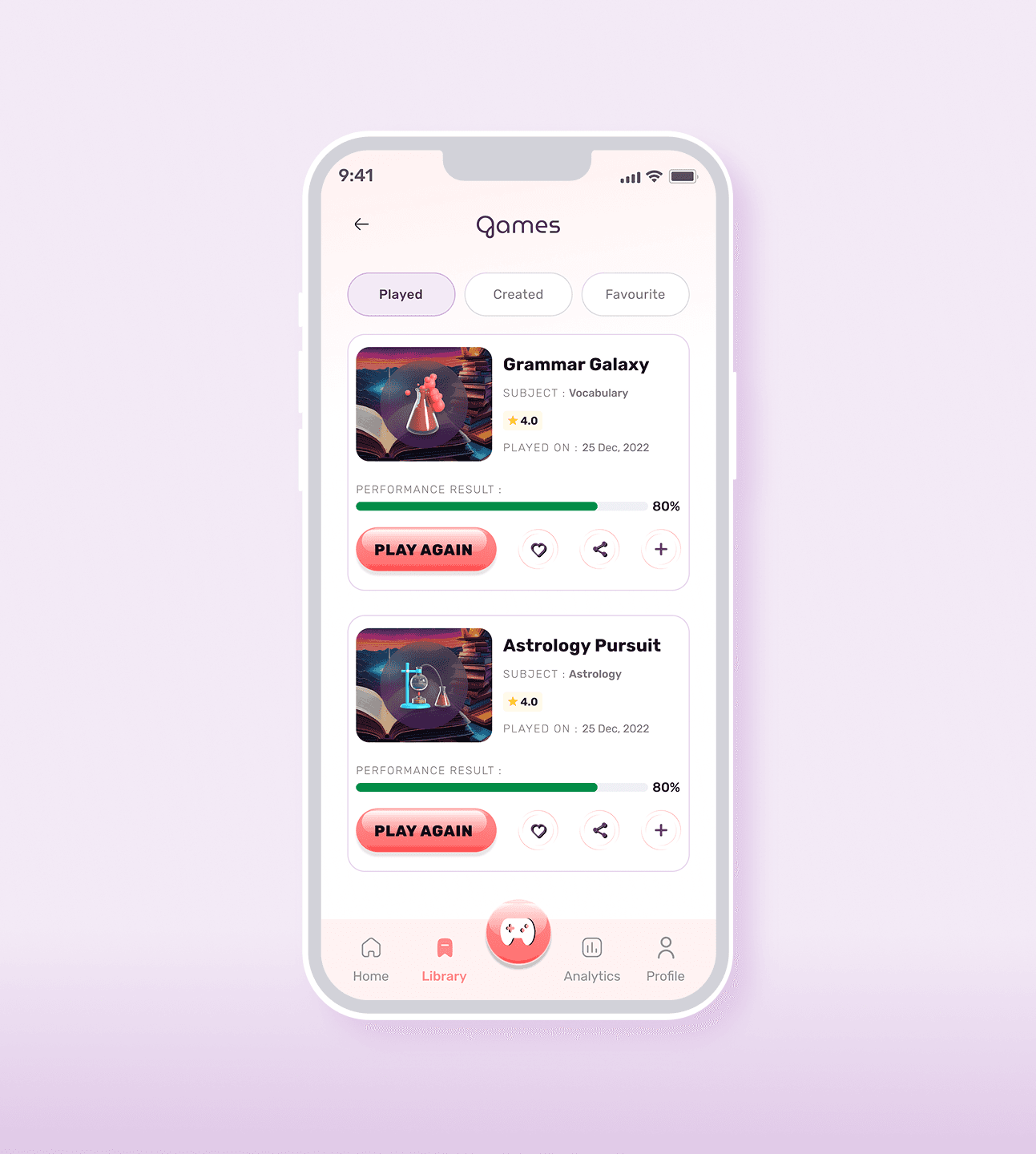
I designed the mobile experience around three core actions: discovering games, selecting an activity and playing through a focused question and answer flow.

Rethinking the visual direction
- Initial exploration: Dark, game-inspired moodboards.
- Client feedback: The direction felt too intense for the intended learning experience.
- Refined direction: A lighter, minimal interface that retained the brand's playful personality.
Exploring Visual Direction
The visual identity is playful but controlled. Bright colours, rounded shapes and game inspired details give the product personality, while a consistent component system keeps every screen predictable for students and educators.
Key Screens
I translated the product requirements into a cohesive interface, balancing discoverability, focused gameplay and clear navigation across the student experience. Each screen was designed around a specific user goal, with consistent patterns connecting the journey from discovery to play.




Designing the Games
4 game templates. No defined direction.
The client shared references inspired by games like Angry Birds and Connect Four, but there were no detailed specifications for how the games should work in a learning context.
Core interaction: students would answer multiple choice questions by selecting an option.
Defining the Game Mechanics
I could not define the games without understanding what makes games work.
So I played a range of them and broke each one down: how a player participates, makes choices, gets feedback and progresses.
Then I mapped how each idea could translate into a question-and-answer format.
SIDE A
The question
An MCQ question presented.
SIDE B
The Options
Answer options to choose from.
Timer
Optional, so educators can switch it on depending on the subject and the game template. Pressure suits some subjects and hurts others.
Scoring
I used success rate in analytics, so students can track their performance without a leaderboard. The score is there to help them learn, not to rank them.
Replayability
Students can replay a game and practise at their own pace.
Difficulty and progression
Moved difficulty levels such as Easy, Medium, and Hard to future scope to prioritise core gameplay.
The Challenge
The brief was open, so the first rounds took several iterations.
The client had a picture in mind but could not put it into words, and my early rounds missed.
Instead of sending more variations, I went back through their call recordings to understand what they were reacting to, not just what they said. Also, kept a working session with the client and PM for the 1st game template. That changed how I read their feedback.
Had calls with developers to check if there are any development contrsaints.

4 Game Themes → Multiple Iterations → Client Recordings → Refined Direction → US Market Launch
The final game templates and client recordings are not shown here due to NDA restrictions.
Template 1 : Blimp Rescue
Concept Exploration
Took inspiration from physics-based games like Angry Birds, where players use simple controls to interact with moving objects.
Explored similar casual game mechanics and references, including balloon based games, before developing the Blimp Rescue concept.
The idea was to combine MCQ-based learning with a simple aim-and-hit gameplay mechanic.
Game Mechanics
A helium balloon is launched using the centre controller to hit falling blimps carrying answer options.
Correct answers revive the blimp, allowing it to float horizontally across the screen.
Incorrect answers cause the blimp to lose helium and fall.
Players must also avoid obstacles like stars that can destroy the blimps.

Admin Dashboard
The admin dashboard gives educators one place to manage their games and see how students are engaging with them, without having to dig through menus or reports.


Future Scope
Four directions grounded in what users asked for during testing and what the engagement data pointed toward.
AI POWERED PERSONALISATION
AI driven difficulty adjustment based on individual progress. Students are challenged at the right level, not the average one.
CROSS CURRICULAR INTEGRATION
Expanding into subjects where quiz formats fall short: coding, arts, and languages all need different interaction models that the current game library doesn't yet support.
LEADERBOARDS AND COMPETITIONS
Time bound challenges that reward learning progress, not just volume. Designed to make engagement competitive without making the experience feel like a race to the wrong finish line.
What I Learned
Ambiguous requirements need exploration, but iteration alone isn't enough. Revisiting client feedback and understanding the intent behind it helped the team align on a clearer direction.